When planning a new website project, one of the questions we hear most often is: “Why WordPress?” Or: “Should we use Squarespace instead? What about Drupal?”
This article is your go-to answer.
It’s our one-stop overview of why we choose WordPress as our standard website content management system (CMS), how it compares to other platforms, and how we use it to build flexible, powerful, and scalable websites.
What is a Content Management System, anyway?
A CMS is software that lets you manage and modify content on a website without needing to write code. Think of it as the engine behind your site that helps you manage everything from blog posts to images to contact forms.
There are many CMS options out there: WordPress, Squarespace, Webflow, Wix, Drupal, Shopify, and more. Let’s dig into why WordPress is our favorite!
Why WordPress?
There are four core reasons we choose WordPress for most projects:
1. Flexibility & customization
WordPress is open-source, meaning the code is freely available for us to use and modify. We can fully tailor every aspect of your WordPress site to fit your exact needs and ensure it dovetails with the custom designs and functionality we need.
2. Ownership & control
With WordPress, you own your site. Unlike hosted platforms like Squarespace or Wix, you’re not locked into a proprietary ecosystem. You can change hosting providers, make deep customizations, and move your content freely as needed.
3. Scalability & longevity
WordPress can scale with you. From a simple landing page to a content-rich site with thousands of pages, WordPress can handle it. WordPress also boasts a wide user base (it’s the most widely-used CMS globally), regular updates, and a massive developer community, so it’s built to last.
4. Ease-of-use
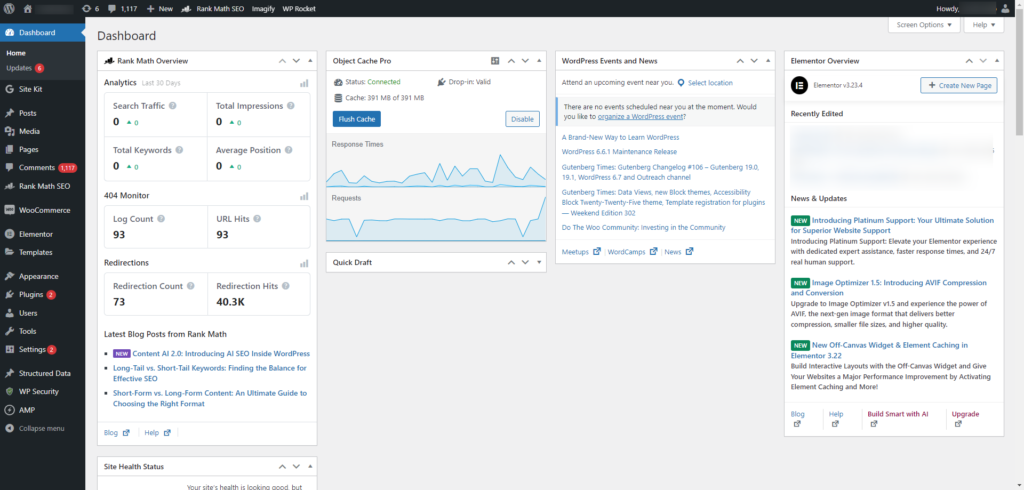
WordPress has an intuitive, user-friendly dashboard that makes it easy to manage your website without technical expertise. Its clear navigation, logical structure, and visual editor options allow you to quickly create and update pages, posts, and media without needing to write code.
All of these reasons are central to the sites we build, including the brand and website that Vermilion designed and developed for East Bay Community Foundation, seen below.
Our approach to WordPress: custom web platforms
Custom website design and development
We don’t just install WordPress and load in a pre-built theme or template. Here’s what comes with a Vermilion-developed WordPress website to give you a top-tier product:
- Audience strategy and insight, so every decision has purpose
- Fully-custom, fully-you design, never from a pre-built template
- Completely editable and flexible to extend your content
- Capacity for complex integrations and functionality
- Best practices for search engine optimization (SEO), generative engine optimization (GEO), privacy, security, and code quality
- Vermilion’s own level of Accessibility Standards (ask us about it!)
- Specialists leading every stage of the process, including User Experience, Art Direction, Web Engineering, and Digital Marketing
- Integrated brand and creative expertise to ensure your organization shows up in the right way
These sites make the most sense when:
- Your brand is ready for elevated representation
- Your content outgrows template constraints
- You’re not meeting your site goals with your current site, but you don’t know why
- Your site becomes a critical infrastructure for your marketing strategy
- Your site’s quality, performance, and accessibility are non-negotiable
This (and more) was applicable for our work with East Coast Greenway Alliance, below, whose finished website ticks all of their boxes.
Easy editing with our two main workflows
We build every WordPress site so our clients can easily update, add content, and grow the site over time without having to call a developer every time they need to change a headline.
Vermilion has two basic approaches to building WordPress sites:
1. When we want drag-and-drop editing and simpler interfaces, we use the Divi page builder to build our custom layouts. This powerful visual builder gives our clients additional design flexibility and intuitive content editing.
2. For more structured or functionally complex sites, we use a fully custom theme and lean on Gutenberg, WordPress’s native block editor, to create reusable blocks and templates that make ongoing content edits fast and intuitive. This creates a more stable, performance-driven website, but with less flexibility to make drastic layout changes over time.
Hand-picked WordPress plugins
Plugins are third-party services that extend WordPress’s standard capabilities. There are tens of thousands of WordPress plugins to choose from, but we take a “less is more” approach, selecting only high-quality, tried-and-true plugins with strong support and frequent updates from their development teams.
Built for performance, accessibility, SEO, and GEO
WordPress is already a very SEO-friendly CMS, but we take this further with our in-house digital marketing experts. They can consult on smart URL structures, clean code, fast loading times, structural GEO recommendations, and on-page SEO setup. Whether you need advanced tracking for an integrated marketing ecosystem or just the basics, we can build it in.
Security and maintenance
WordPress is a secure platform when set up correctly, and we take site security very seriously. We strengthen your website’s security before launch and offer ongoing support and maintenance packages if needed. It’s not just about setting you up for success but also ensuring you have the tools to stay secure.
What WordPress is not
WordPress is our go-to solution, but in all fairness, it isn’t the right fit for every situation. If you need a quick and simple brochure site with limited customization, Squarespace is likely a better option. If you’re looking to manage deeply complex enterprise systems and tiered site content permissions, Drupal could make more sense. If you need to set up an out-of-the-box online store quickly using a pre-built template, you probably want Shopify.
But for most custom website projects where branding, storytelling, flexibility, SEO, customized e-commerce, and long-term growth are priorities, we’re convinced WordPress is the most balanced and powerful choice.
| Feature | WordPress | Squarespace | Drupal | Shopify |
|---|---|---|---|---|
| Best for | Multi-purpose sites of any size; ideal for long-term growth | Freelancers, portfolios, or simple business sites | Complex and content-heavy enterprise sites | E-commerce-focused stores and CPG without complex functionality needs |
| Ease of Use | Slight learning curve – we provide comprehensive training! | Beginner-friendly drag-and-drop builder | Requires developer expertise | Easy for beginners |
| Customization | The world is your oyster… seriously | Limited by templates, with some code options | Highly customizable via code | Limited to themes and apps, with coding needed for advanced edits |
| Flexibility / Scalability | Easily scalable with your business or needs | Limited for complex growth | Very flexible but developer-dependent | “Stock” Shopify limits flexibility and growth for large or complex stores |
| Security | Very strong with regular updates and proper setup | Reliable built-in protections | Enterprise-grade features | Robust for payments and e-commerce |
WooCommerce vs. Shopify: when your WordPress site needs to sell
WooCommerce is the better fit if you want maximum control, deep customization, and potentially lower base platform costs. Shopify is the better fit if you want faster setup, simpler maintenance, and a fully hosted platform with less technical overhead. When a project involves an online store, WooCommerce is often our go-to solution inside the WordPress ecosystem.
It’s built directly on WordPress, combining content and commerce in one platform so you never have to sacrifice customization, ownership, and scalability. WooCommerce is open-source and highly adaptable, which makes it ideal for brands that need a more tailored experience than a stock e-commerce template can provide. For projects that need the right balance of content, product management, and checkout functionality, WooCommerce gives us the freedom to design a branded shopping experience while still keeping the site grounded in the same WordPress platform we use for the rest of our work.
With that said, we can also do both! A WordPress site with Shopify integration lets you keep your main website on WordPress while using Shopify to power the shopping cart, checkout, and product management.
Common questions we hear
“How much flexibility will I have with updating content?”
Vermilion aims to give our clients confident ownership of the site after launch. We’re not a set-it-and-forget-it agency, but we don’t want you to have to email us for every little change. You’ll be able to update all text content, swap images, create new pages, alter the menu, and more—all without touching code.
“Is WordPress secure?”
Yes, with proper setup and ongoing maintenance. We follow best practices and offer support packages to keep things secure long-term. Like any website, updates and maintenance over time are critical to avoid security gaps.
“Can I migrate content from my existing (Drupal, Wix, Squarespace, etc.) website to WordPress?”
Yes! We handle site migrations all the time. Often, some content can be migrated directly from the old database to a WordPress database. Sometimes it needs to be copied over manually.
“Do you use pre-made templates?”
Sometimes, but not often. Only when it makes sense for timeline and budget constraints. Most of our WordPress work is custom-designed and built to match your specific brand and goals.
“Hey Robot, build me a website!” — thoughts on AI and web development
Many (so, so many…) website design and development tools powered by generative AI agents have entered the market over the last few years. These services promise to generate designed page layouts, write content, build features, or even generate entire sites from a simple prompt. We pay close attention to these technologies, testing new platforms and workflows as they emerge.
Some of these tools are already proving useful for making individual steps in our process more efficient. However, they are not yet capable of replacing large portions of the website-building process. We will continue to incorporate new tools, including AI tools, where they improve our workflow. But today, creating a high-performing and thoughtfully designed website still depends on experienced human craftsmanship.
Pulling it all together
We recommend WordPress because it offers the best balance of power, flexibility, control, and user experience for most of our clients, even for groups as seemingly different as Protect Our Winters and Movement. It’s a platform that grows with you, works beautifully when designed well, and gives you the freedom to do things your way.